Contents
- Index
Phrase Boxes
A Phrase Box is a box containing a list of words or phrases. Its purpose is to store text for import into, or export from, a map. An example is:
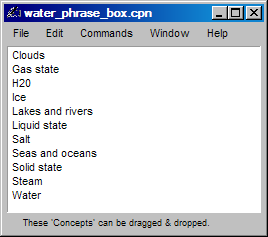
In Conception, use the 'Demo' button in the File/New dialog to get this Phrase Box.
Creating a Phrase Box
A Phrase Box can be created using items from an existing map by selecting a List menu command. The Phrase Box will automatically be filled with the appropriate items.
Alternatively, use File/New and select Phrase Box. Then either select the Edit/'Insert new items' command and fill the box with items by typing them directly or select File/Import and choose an existing text file that contains the required items (which should be separated by commas or one per line ending with a period).
Transferring text from a Phrase Box into a map
Use drag-and-drop.That is, drag items from the Phrase Box window and drop them directly onto the required nodes.
Transferring text from a Phrase Box into a word processor
In the Phrase Box window, select File/Export to create a text file, or select Edit/'Copy all' to copy items into the computer's clipboard. Then in the word processor, use File/Open or Edit/Paste respectively.
Transferring text from a map into a Phrase Box
In the map window, use a List menu command.
Back to start of help